Project for CSS Class by Jonathan Molina 02/23/06
- HTML 4.0 On-line Tutorial
- Creating CSS Style in Dreamweaver - Also Blackboard Videos
- HyperText Coined In 1965
- Basic.htm Using Browser Tag Definitions
- Basic1.htm Using Local Style Definition
- Basic2.htm Uses an External Style Sheet Basic2.css
- Precedence Most Recent Mask Previous Styles except More Specific Tags Mask Less Specific
- CSS Import Precedence Most Recent Mask Previous Styles Except Main CSS File Has Precedence
- two selectors , comma separator
- em descentant of p example
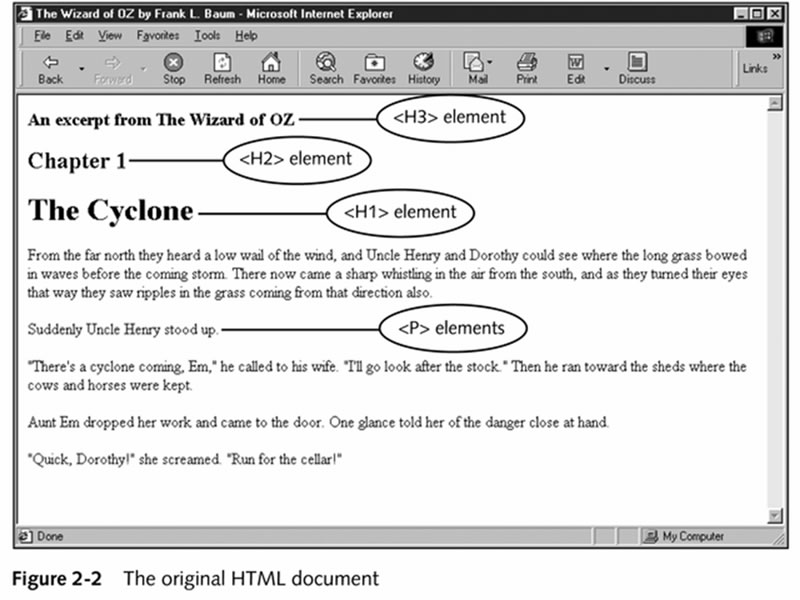
- Figure 2-2 of Book Oz Image
- Page 30 Oz.htm File No CSS
- Oz1.htm : Oz CSS rules...
- H3 {text-align:right; color: gray;}
- H1, H2 { margin-left: 20px; font-family: sans-serif; }
- H1 { border:1px solid; padding: 5px; }
- P { margin-left:20px; font-family:serif; font-size:14pt; }
- Core Attributes present in all HTML tags
- Note example quote and procedure classes
- id class firstQuote, preface
- span and div example span.htm
- Pseudo Class :active :focus, :hover, :link, :visited, :unvisited
- Pseudo Link HTML
- Pseudo Focus Forms HTML
- Pseudo Element HTML
- Figure 2-17 div > blockquote child.htm selector;
use sibling so that when h3 follows h2 its black on gray
- Original File Displayed by Browser Our Alice.htm both Versions with CSS
-
-
- descendant Example Fairly Complex, with font-size illustrations
- descentant Summary
Class ID example classID.htm
-
- Basic Fonts "Dreamweaver Likes to Insert 3" Figure 3-1
- Courier
- Fixed Width
- Verdana sans-serif more horizontal space (viewgraphs online)
- Printed Material Times or New Century Schoolbook
- Size should be pixel (px), percentage or name relative
- Others: cm, in, pt ( , em (width of m), ex (height of x), px, 150%.
- Yes you can specify inches fontMargins.htm
- Font Size figure 3-3 Enhanced
- Font Properities
Text Examples - Online Book Companion
Remember its the Server Side Engine Then JavaScript Engine Finally Rendering Engine
- Text Decoration Figure 3-7
- Figure 3-16 no CSS Figure 3-24 3-16 with CSS
- textShadow.html Basic Example, Shadow, Dual Shadow
- textShadow2.html 3D Effects, White knock out text, Inset and Outset
- textShadow3.html Neon and Outline
- Saddleback.edu Server is Blocking *.otf Files the Three Examples Below Had to Be Moved to cim.saddleback.edu
- webFonts.html Loading Fonts over Web using @font-face
- Add JavaScript Code to Detect IE, and load eot font instead of ttf webFonts2.html
- webFonts3.html IE hack, load eot font, then trick IE, load local, then ttf font
- CSS2 Image Fixed Top Right, what does min-width do?
- CSS3 Gradients, basic moz gradients, user colorzilla gradient generator, to support all browsers
- CSS3 Border Radius, basic border-radius tag, then a few fancy border radius.
- CSS3 Background-size and multiple images tabsCS5.htm supported by only Opera (10/2011)
- CSS3 Box Shadows, similar to H5 Text Shadows - Interactive box Shadows generator
- CSS3 Transform tag, with functions scale, rotate, skew, you also have scalex, scaley, skewx, skewy
- button transform
- 50 Awesome CSS Transitions (they use webkit prefixes, some work in firefox 7, more in Opera, probably safari/chrome best choice)
- CSS3 Button, CSS3 is nice but it has a feature creep problem (outlook has application bloat) ;
Right Tool for the Right Job - Photoshop/GIMP/Fireworks
- Position Quiz
- normal.html Four div blocks, red, green, blue, yellow normal flow.
- Set height 100px; Width to 200px size.html
- blue, green box with pixel offsets top, left offset.html
- blue, green box with relative percent offsets offsetPercent.html
- Bottom, right 0%, 0% offsetPercent2.html
- fourCorners.html put box in each of the four corners.
- four Corners all in Top, left outside browser viewport fourCornersTL.html
- Relative position and size; yellow box inside of a blue box relative.html
- Opacity.html, opacity, z-index example CSS3
Daily Howl Examples (none)
- Overflow:hidden overflow.html discard overflow text in yellow box inside of blue, relative.html;
- filter filter.html not working - css3 only
- IE Filter Argument Settings
-
-