DW4 Assignment
-
Default "Universal" Short-cut Keys Short-Cut Description Ctrl^A Select All Ctrl^C Copy (takes whatever is select and copies it to clipboard) Ctrl^F Find something Ctrl^S Save Command Ctrl^V Paste what is in clipboard to the current cursor location Ctrl^Z Universal Undo Command F12 Preview in the Selected Browser - this is not Universal
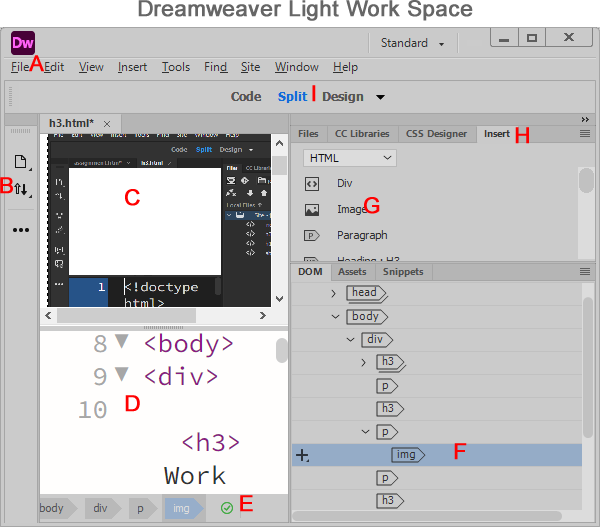
- Is your file menu; File Save
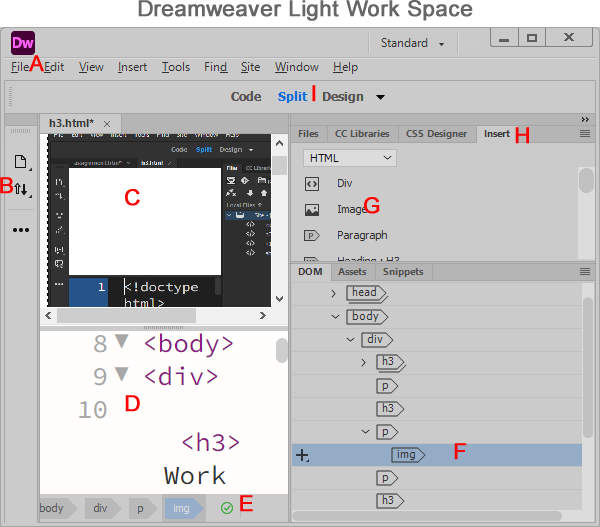
- Side Tab Bar or Menu
- Editing Pane
- Code Pane Window - HTML CSS
- HTML Validation
- F is an Img tab currently selection
- G. Image tag to insert image on web page
- H. Insert Panel (HTML tags)
- I. View for Editing Panel (Design easiest to edit, but no JavaScript executed)
Insert Panel Menu Items
HTML list popular HTML tags
Form list the HTML 5.0 input form elements
BootStrap is standard for creating webpages, gives you default HTML structure, CSS and JavaScript.
jQuery UI - jQuery User Interface items; jQuery JavaScript very popular, easy to create web pages using JavaScript.
© Editing Date: Oct 27, 2025
→ Use the Insert Dialog Panel bottom Icon insert Date, Horizontal Rule, and and an HTML entity.
- Where do we see UTF-8, what is UTF-8, 8 Hex digits. for all characters the first 128 is the standard 26 english language letters "ASCII". 8 bit space 256 letters; 8x4=32 bits 2^32 = 4 Billions letters;
- Lets look at a Emoji Face 😜 😎 ☔ 🐻
- Insert some of your. favorite Emoji animals into your web page, Can put them inside of insert heading H1.
