| Shortcut | Description |
|---|---|
| Ctrl^A | Select All |
| Ctrl^C | Takes whatever is selected and copies it to clipboard |
| Ctrl^F | Find something |
| Ctrl^S | Saves command |
| Ctrl^V | Pastes what's in clipboard to current cursor location |
| Ctrl^Z | Undoes an action |
| F12 | Preview in the selected browser. This is NOT a Universal Key |
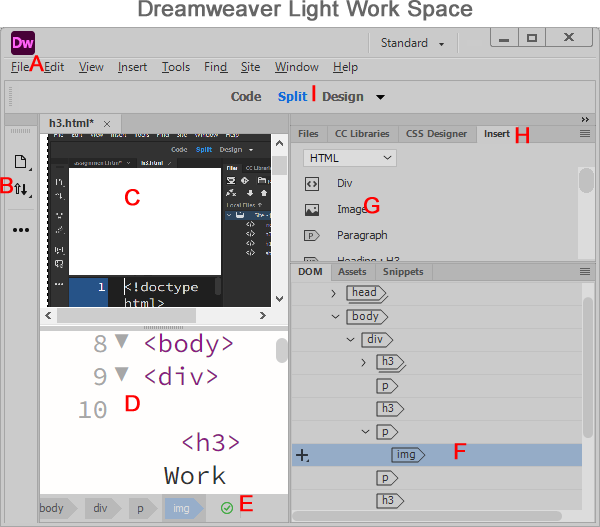
A: File Menu
B: Document Toolbar Menu
C: Editing Pane
D: Code View
E: Document Status Bar
F: Document Object Model (DOM) Panel
G: Image Insert Tool
H: Insert Panel
I: Files Panel
The Insert Menu is a top-menu command, while the Insert Panel is a toolbox panel with shortcuts to insert the same HTML elements such as images, tables, links, forms, and media. The Insert Panel is usually quicker for everyday web design work.
Form An HTML form is used to gather user input by using elements such as text fields, check-boxes, and submit buttons.
Bootstrap is a web development framework that helps create responsive websites that adjust to desktops, tablets, and mobile devices.
jQuery UI adds interactive components to websites, including date selectors, dragable objects, and popup dialog windows.
Date, Horizontal Rule, and HTML Entity
© October 23, 2026
UTF-8 (Unicode Transformation Format - 8-bit) is the most widely used character encoding on the web. It is a system that converts characters such as letters, numbers, punctuation marks, symbols, and emojis into a format that computers can store and display.
UTF-8 uses between 1 and 4 bytes to represent a Unicode character. Each byte contains 8 bits.