| Short-cut | Description |
|---|---|
| Ctrl^A | Selects all text or content in the document |
| Ctrl^C | Copies the selected text or content |
| Ctrl^F | Searches for text in the document |
| Ctrl^S | Saves the current document |
| Ctrl^V | Pastes copied or cut text or content |
| Ctrl^Z | Undoes the last action |
| F12 | Previews the current web page in a browser (Dreamweaver shortcut) |
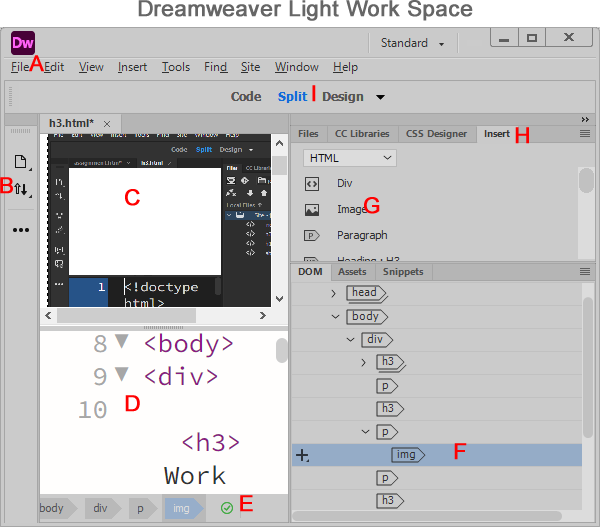
A (Menu Bar) - Provides access to commands such as File, Edit, View, Insert, and Tools
B (Toolbar) - Provides tools for working with the current document view
C (Design View) - Displays the visual layout of the page and allows visual editing
D (Code View) - Displays the source code of the page and allows code editing
E (Validation Indicator) - Indicates whether Dreamweaver has detected errors in the code
F (DOM Panel) - Shows the structure of the HTML document and allows you to select elements
G (Insert Panel Content) - Displays elements you can insert, such as images, paragraphs, and divs
H (Panel Tabs) - Allow you to switch between panels such as Files, CSS Designer, and Insert
I (View Controls) - Allow you to switch between Code, Split, and Design or Live views
Insert Panel Menu Items
The Insert Menu is located in the menu bar at the top of Dreamweaver. It provides commands for adding elements to a web page. The Insert Panel displays buttons organized into categories, such as HTML and Form. Both allow you to insert images, tables, links, and other elements.
A form collects user information through fields, checkboxes, and buttons.
Bootstrap provides ready-made components for building responsive websites.
jQuery UI provides interactive elements such as tabs, calendars, and accordions.
© Editing Date: October 26, 2026