| Ctrl+A | Select all |
| Ctrl+C | Copy |
| Ctrl+F | Find |
| Ctrl+S | Save |
| Ctrl+V | Paste |
| Ctrl+Z | Undo |
| F12 | Preview in browser (Dreamweaver-specific) |
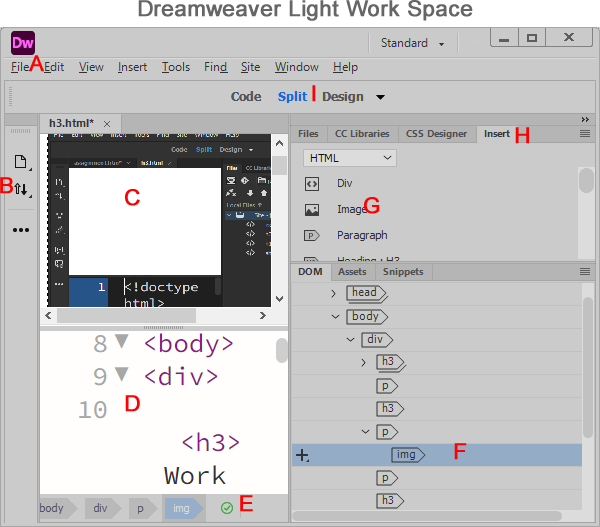
A — Menu bar: Provides access to Dreamweaver commands and menus.
B — Left toolbar: Offers quick access to commonly used tools.
C — Design pane: Shows the visual layout of the web page.
D — Code pane: Displays the page's HTML source for editing.
E — Validation status: Indicates the document's HTML validation status.
F — DOM/tag tree: Shows the nested structure of the page's elements.
G — Image item in the Insert panel: Inserts an image into the page.
H — Insert panel tab: Opens the panel of elements available to insert.
I — Code/Split/Design view controls: Switch between source code, a combined view, and visual editing
| Insert Menu | Insert Panel |
| Opens from Insert on the top menu bar as a dropdown of categorized commands, sometimes with nested submenus. | Stays open as a persistent tabbed panel, with visible categories, icons and tools. |
| Choose a category and command to insert an element at the cursor. | Select a category and click a visible tool to insert an element at the cursor. |
| Inserts HTML elements such as images, paragraphs and tables. | Also inserts HTML elements such as images, paragraphs and tables. |
Insert Categories: Form, Bootstrap and jQuery UI
Form: A set of HTML controls that collect user input, such as text fields, checkboxes and submit buttons.
Bootstrap: A front-end framework that provides responsive layouts and reusable CSS and JavaScript components.
jQuery UI: A collection of jQuery-based widgets and interactions, such as accordions, date pickers and draggable elements.
October 27, 2026
©
UTF-8 is a Unicode text encoding declared in this page's meta charset tag in the head. It supports characters from many languages, including emoji.
A less-than sign in HTML text: <
In HTML text, write < to display a less-than sign (<) without starting a tag. The ampersand (&) begins a character reference. Decimal references use &#number; and hexadecimal references use &#xnumber;. End each reference with a semicolon.
Decimal cow: 🐄 displays 🐄. Hexadecimal cow: 🐄 displays 🐄. Both references display the same cow emoji.