Chapter 3: Selectors
Style Definition
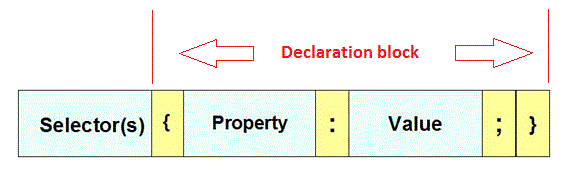
Selector { declaration; }
Declaration PropertyName:PropertyValue Pair
Declaration block is enclosed { }
Rule Set = Selector with Declartion Block
A CSS statement can be a rule set or an @ directive
Selectors can be HTML tags (aka XML nodes names),
DW can use split view, or window → code inspector, css Designer panel, or live view right^click code navigator
Browser inspect element (left most icon) and Right^click inspect DW
Class names and IDs follow standard CSS variable naming convention, must begin with letter, are case senstive, can have numbers, hyphens and underscores.
In programming languages hypens is a subtraction operator.
Nomenclature: naming convention - be consistent; Mnemonic class names have meaning
| a | 9Lives | e | copy_right | i | special | ||
| b | crazy8 | f | copy right | j | style | ||
| c | copy-right | g | COPY_RIGHT | k | banner_image | ||
| d | copyRight | h | cr | l | -banner |
not legal 9Lives, f copy right, (you can start with - banner)
RegExp: -?[_a-zA-Z]+[_a-zA-Z0-9-]*
h cr is not mnemonic (carrriage return?)
same nomenclature copy_right, banner_image; same copyRight, style, special
best practice don't use all caps COPY_RIGHT be consistent with caps, avoid keywords j style
Once again class can be used more than once,its a class;
And like a student, the same student (aka ID) can be in more than one class cimw140 and cimw105 at the same time.
For DW testing use, set CSS designer to current show set, then go to live view, inspect mode.
Best practice use IDE to set class names, be carefull on class name This in not class special red text
Also verify current work, using Web browser inspect with both computed and styles.
| Selector | CSS | HTML Example |
|---|---|---|
| HTML (xml node name) tag names | h1 { color : #ccccff; } | Header One |
| Class Name Group of tags | .special { color:#FF0000; font-family:"Monotype Corsiva"; } |
This td is set to class="special" |
| ID used to uniquely identify an element | #banner { background: #CC0000; height: 150px; width: 360px; } |
This td is set to id="banner" |
| Comma is used to separate more than one selector using same rule | #banner, h2 { color: #f1cd33; } | Same foreground color as id="banner" |
| Universal Selector, wildcard * | * { font-weight: bold; padding:0; margin:0; } |
Would set entire page to bold, and eliminate all browser default paddings and margin, Browser Resets. - Normalize, is better and will be covered later. |
| Descendant selector is Space, body and head are first two children (aka descendants of html). This body has several h1 descendants some are childern, h1 to the left is body table tr td h1 (great-great-grandchild), You can have a descendant of a id or class. |
h1 strong { color: red; }
#descendantInfo span { color:yellow; background-color:black; }
body h1 strong {color:red;}
table h1 strong { color:red; }
|
This is h1 with a strong taginside. |
| Create a module class contact, with descendant classes, name, phone, note if you have just one contact at the bottom you would use ids instead. | .contact .name { font-weight: bold; } .contact .phone { color:blue; } |
This is my contact box... John Smith 555-555-1234 |
| Pseudo Classes represent visited - mouse states :hover - mouse rollover; a:visited visited link, :focus has keyboard focus |
.pseudoClass:hover { color: blue; background-color: black;} .pseudoClass a:visited { color:white; } visit once |
This td is of class="pseudoClass", cimw140 | cimw160. Can clear browser history. |
| Pseudo Elements - locations inside tag content; :first-letter, :first-line |
#pseudoElement:first-letter { font-size:2em; color:black; background-color:white; } | This td is of id="pseudoElement" but since I'm only using once, I set it as an id instead of class |
| Pseudo element - :before and :after, can insert content before and after text inside the tag. | .tip:before { content:"Hot TIP"; color: blue; } .tip:after { content: "The End" } |
This is a td with class tip, it should be blue with content before and after. |
| can use attribute p[title] select all p tabs with attribute title. | p[title] { color: green; font-weight : bold; } | This is not green and has no rollover. This paragraph has a rollover title. |
| > child of element, html > body is always true body > h2 would not apply to h2 in this table Inspector will often give full descendant path and/or child path |
body > td { color: lime; } does nothing td is a a descendant not a child, table is the child |
|
| :nth-child( even ) or nth-child( 5 ); | tr:nth-child( odd ) { background-color: aaa; } tr:nth-child( 5 ) { background-color: blue; } |
|
| + adjacent siblings | table#second+p { background-color: blue; color:white; } | Paragraph tag the immediately follows the table#second |
Note you can select anything on a page. Sizzle, the jQuery selector uses CSS syntax selector.
CSS Selector Summary:
Assignment is tutorial Selector Sampler page 70.
Creating a Group Selector Page 73
Creating and Applying an ID Selector page 75
Creating and Applying a Class Selector page 78
Creating a Descendant Selector page 80
Finishing Touches page 81